Learn how to avoid international roaming charges with our guide. Compare eSIMs, local SIMs, and carrier plans to stay connected abroad without surprise bills.
You get home from a great trip, reconnect to normal life, and then your carrier sends the message you were hoping not to see. The bill is full of charges you didn't plan for, and half of them came from moments when you weren't even actively using your phone. A map refresh. An app update. A cloud backup running in the background.
That used to feel like part of international travel. It doesn't anymore.
The biggest change is simple. eSIMs have made it possible to set up travel data before departure instead of gambling on your home carrier's roaming service after you land. That shift has changed international connectivity from a reactive problem into something you can manage in advance, with far more control and much less friction, as noted in Airalo's overview of eSIM-based travel setup.
What works now isn't just “find Wi-Fi” or “buy some data.” It's building a travel connectivity workflow. Decide what you need before the trip, set your phone up so it can't betray you, and use the right connection for the right job once you arrive. That's how to avoid international roaming charges without ending up disconnected, stressed, or hunting for a SIM kiosk after a long flight.
The End of Surprise Roaming Bills
Roaming charges usually don't come from dramatic phone use. They come from ordinary behavior on an unprepared device. You land, switch your phone on, and it starts doing what it always does. Mail syncs. Photos back up. Maps look for fresh data. Your phone connects to a foreign network because you allowed it to, and the meter starts running.
That's why the old advice about “being careful” was never enough. Careful people still got charged. The phone was doing the damage in the background.
Practical rule: The real decision isn't whether to use your phone abroad. It's whether your phone is allowed to use your home carrier's roaming data at all.
For years, travelers had two clumsy choices. Pay your home carrier's roaming rates or buy a local physical SIM after arrival and deal with the friction. The reason this problem feels more solvable now is that eSIM-first travel has turned setup into something you can finish before the airport. You can install a travel plan in advance, keep your primary line under control, and land with a working data option already waiting on the device.
That changes the psychology of the whole trip. Instead of reacting to connectivity problems on arrival, you start with a system. Home line protected. Travel line ready. Offline essentials downloaded. Wi-Fi used where it makes sense. Sensitive tasks kept off open networks.
Anyone learning how to avoid international roaming charges doesn't want to become mobile-network experts. They just want a setup that works every time. That's the right goal. You don't need a hack. You need a repeatable playbook.
Your Pre-Trip Connectivity Checklist
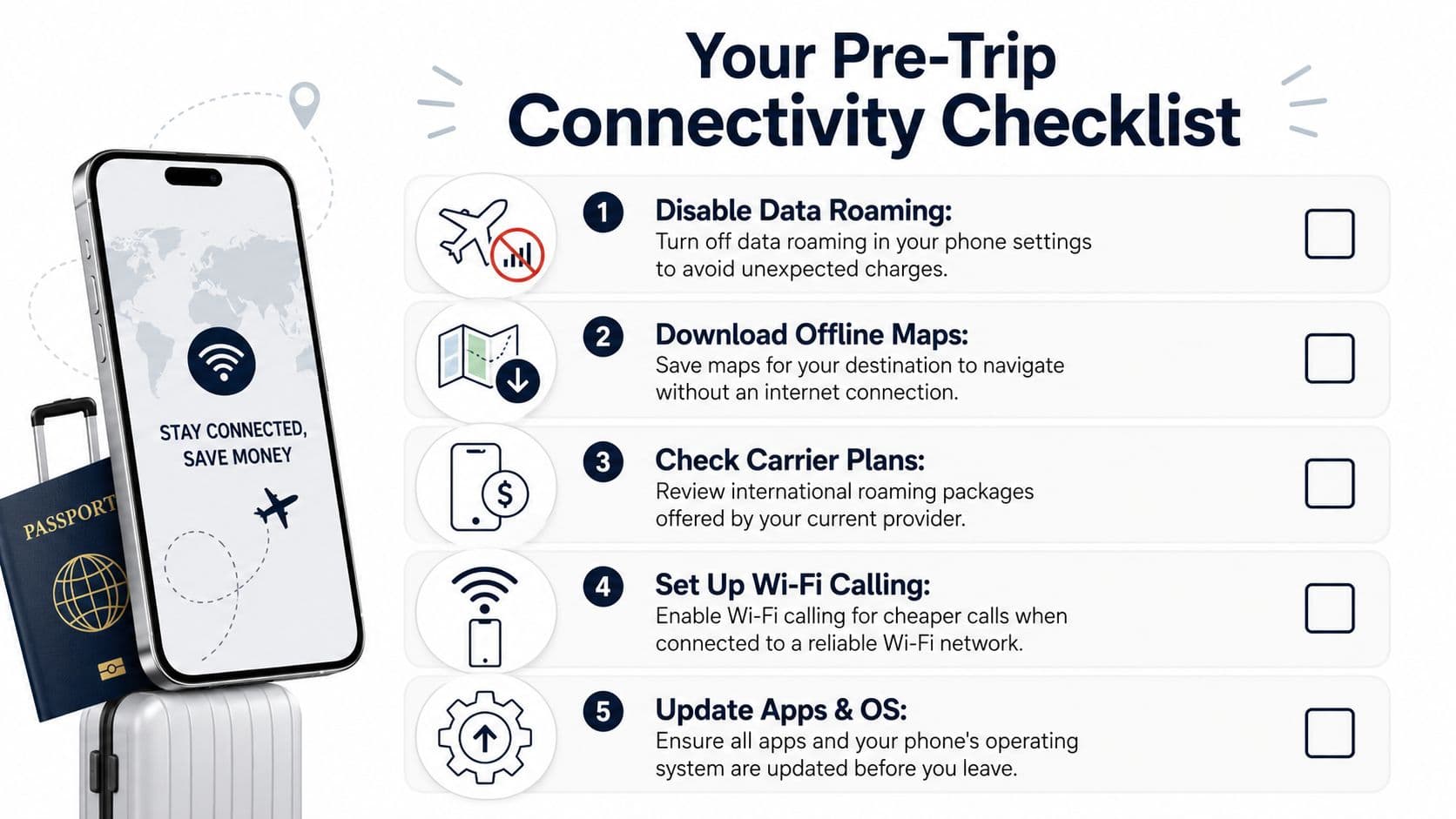
The most important work happens before you leave home. If your phone is configured properly on your own Wi-Fi, you remove most of the risk before boarding.
Start with the setting that matters most
If you do one thing, do this first. Turn data roaming off on your primary line before departure, or as soon as you land. That's the most reliable way to avoid international roaming charges because roaming fees are commonly triggered by background cellular activity you didn't intend to use, according to GoAbroad's guidance on using your phone internationally without charges.
After that, tighten the rest of the system:
- Disable automatic app updates: App stores love to download in the background unless you stop them.
- Pause photo backups and cloud sync: Camera uploads are one of the fastest ways to burn through data unintentionally.
- Turn off background refresh where possible: News, weather, mail, and social apps all try to stay current.
- Enable Wi-Fi calling if your carrier supports it: It gives you another path for calls without leaning on roaming.
- Check your expected usage: If you're not sure how much travel data you need, this guide on what 5 gigabytes of data typically covers helps set expectations before you buy anything.
A lot of surprise bills are really setup failures. Travelers assume they'll “just use less,” but the phone keeps behaving normally unless you tell it otherwise.
Download what future you will need
The second layer of defense is reducing your need for live data in the first place. Navigation, boarding documents, music, and key travel details should be available offline before you leave.
I'd prioritize these:
- Offline maps: Download your destination in Google Maps or Apple Maps.
- Saved entertainment: Music, podcasts, shows, and reading apps should be loaded over home Wi-Fi.
- Transport details: Airline apps, rail tickets, hotel confirmations, and local reservation screenshots.
- Messaging setup: Make sure the apps you rely on are installed, logged in, and updated.
- Critical updates done at home: Operating system updates and large app updates should never wait until travel day.
Downloading before departure doesn't just save money. It gives you margin for the first hour after landing, when airport Wi-Fi is flaky and you haven't fully switched over yet.
There's also a mental benefit. Once you know maps, tickets, and core communication tools are already on the phone, you stop treating connectivity like an emergency. That makes it much easier to choose the cheapest and safest connection instead of the first one your phone finds.
Comparing Your Four Main Connectivity Options
You don't need the same setup for every trip. A three-day city break, a month abroad, and a work trip with constant messaging all call for different choices. Mainstream travel guidance now treats eSIMs, local SIMs, and Wi-Fi as standard options, which makes the primary task less about avoiding roaming in panic mode and more about choosing the lowest-friction method for the trip, as reflected in EasySim's discussion of modern roaming alternatives.
International Connectivity Options Compared
| Option | Average Cost | Convenience | Best For |
|---|---|---|---|
| Travel eSIM | Varies by provider and destination | High | Travelers who want setup before arrival and fast activation |
| Local physical SIM | Often competitive, varies locally | Medium to low | Longer stays, budget-focused travelers, people comfortable swapping SIMs |
| Home carrier international pass | Usually more expensive than local alternatives | High | Short trips, low setup tolerance, people who want to keep everything unchanged |
| Wi-Fi only | Lowest direct cost | Medium | Light-use travelers, offline-first trips, people comfortable planning around hotspots |
The table makes one thing clear. There isn't one universal winner. There is a lowest-friction winner for your situation.
A travel eSIM is usually the cleanest modern option. You install it before departure, activate it on arrival, and keep moving. No store visit. No plastic card. No digging out a SIM tray tool in an airport terminal. That convenience is why eSIMs have become the default choice for a lot of experienced travelers.
A local physical SIM still has a place. If you're staying longer, want a locally issued number, or prefer buying directly from an in-country carrier, it can be a sensible move. The trade-off is friction. You may need to find a store, review local plan options, and physically swap cards.
A carrier travel pass is the easy button, but not always the smart one. It works best when your trip is short, you don't want to touch settings beyond the basics, and convenience matters more than optimization. I think of it as a premium for not changing your workflow.
Wi-Fi only sounds attractive until your day depends on it. It's fine for low-stakes travel if you've downloaded maps, use messaging over Wi-Fi, and don't mind gaps between connections. It's a weak choice for anyone who needs reliable access while moving through a city, handling work messages, or calling rides on demand.
How to choose without overthinking it
Use this simple framework instead of comparing plans forever:
- Choose eSIM when you want to land connected, keep your setup simple, and avoid relying on your home carrier.
- Choose a local SIM when you're staying longer or want a local mobile presence badly enough to accept some setup friction.
- Choose a carrier pass when you're taking a short trip and would rather pay for simplicity than manage another line.
- Choose Wi-Fi only when your usage is light, your itinerary is stable, and you've prepared offline tools properly.
If your trip includes remote work, live navigation, ride-hailing, or time-sensitive communication, don't build your whole plan around finding free Wi-Fi.
One useful middle ground is combining methods. A traveler might use an eSIM for routine mobile data, hotel Wi-Fi for heavier downloads, and offline maps as a backup. That kind of layered setup is what usually works best in practice.
If you want one modern example, RoamFly offers travel eSIM plans that can be installed before departure so you can use mobile data abroad without depending on your home carrier's roaming service. That doesn't make local SIMs or carrier passes obsolete. It just reflects where the market has moved. For many trips, digital setup before takeoff is the cleanest path.
The eSIM Workflow From Purchase to Landing
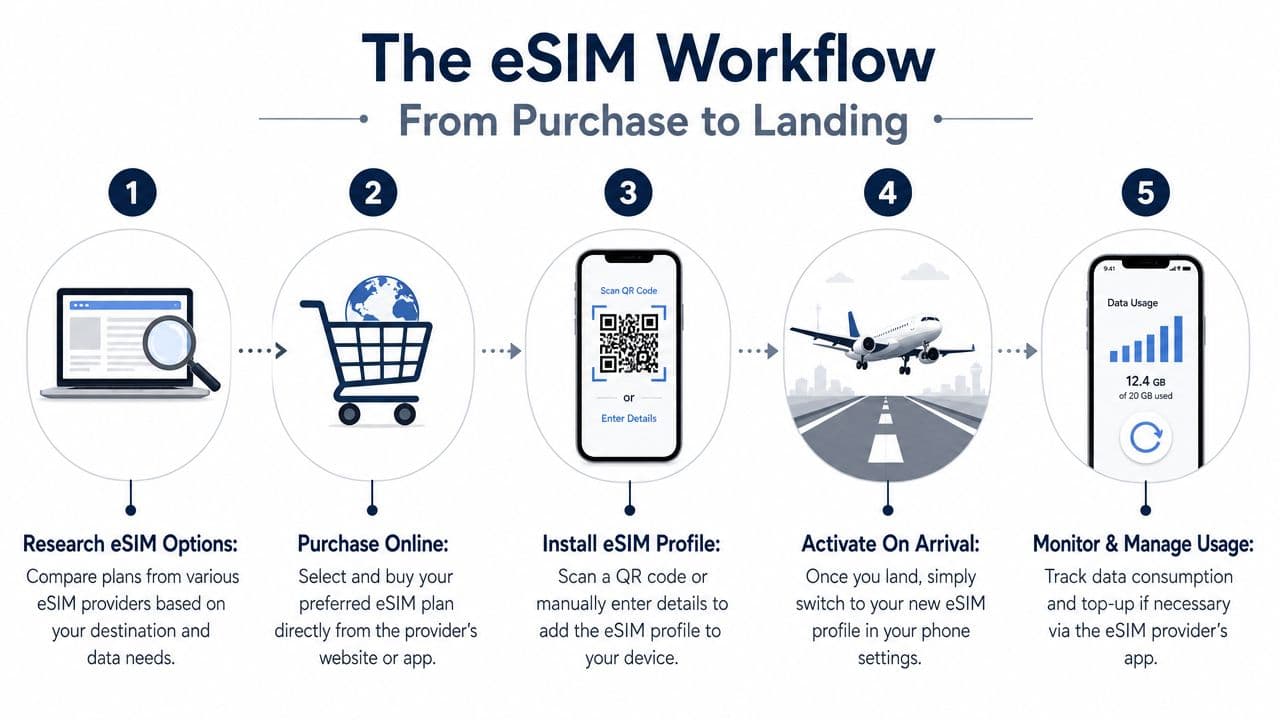
The best thing about eSIM isn't just price control. It's operational control. You can finish the hard part at home, while you still have reliable Wi-Fi, time to read the settings, and zero pressure.
A visual overview helps:
Set it up before you leave
The expert workflow is straightforward. Install the travel eSIM before arrival, verify it while still on home Wi-Fi, then activate it when you land while keeping your primary line's data roaming off, as described in Saily's travel eSIM setup guide.
Here's the sequence I'd use every time:
- Buy the plan before departure. Don't wait until airport Wi-Fi is overloaded or your arrival is delayed.
- Install the eSIM profile at home. Use the provider app or QR code while you have stable internet.
- Label your lines clearly. “Home” and “Travel” is better than trying to remember carrier names inside settings.
- Keep the travel line off until landing if needed. Installation and active use don't have to happen at the same moment.
- On arrival, switch mobile data to the travel line. Then confirm the phone is using it.
If you want a broader primer on setup and compatibility before a trip, this guide to using an eSIM for travel is worth reviewing.
Later in the process, a walkthrough can help more than text alone:
Avoid the dual SIM mistake
Most roaming mistakes with eSIM happen on dual-SIM phones. The travel line is installed correctly, but the primary line is still allowed to handle data, or the device is allowed to switch data sources automatically.
That's where people get burned.
Check these settings after landing:
- Primary line data roaming stays off: This matters even if you think you won't use that line for data.
- Travel eSIM is assigned to cellular data: Don't assume the phone picked it automatically.
- Mobile data switching is disabled if your phone offers it: Otherwise the handset can jump to the wrong line.
- Primary line is deactivated if you don't need it: That's the cleanest way to prevent fallback.
- Test with a simple task: Open maps or send a message and confirm it works on the travel line.
A correctly installed eSIM can still produce roaming charges if the wrong line remains active for mobile data.
The smoothest arrivals I've seen all follow the same pattern. Setup is done before departure. The travel line is activated only when needed. The home line is tightly controlled. That's what makes eSIM feel effortless rather than fiddly.
Smart Habits for Managing Data and Security Abroad
Saving money is only half the problem. The other half is staying connected in a way that doesn't create security headaches or force you into bad trade-offs later in the trip.
Use less data without feeling restricted
You don't need to babysit every megabyte. You just need a few habits that stop waste.
- Use Wi-Fi for heavy lifting: App updates, cloud sync, and media uploads can wait for a trusted connection.
- Turn on low-data modes where available: Phones and apps often have settings that reduce background usage.
- Prefer messaging apps over carrier services when possible: If you're wondering how messaging affects your travel setup, this explainer on whether text messages use data helps clarify what runs over cellular data and what doesn't.
- Use Wi-Fi calling deliberately: It can be useful, especially when paired with hotel or apartment Wi-Fi you trust.
- Keep offline tools in rotation: Maps, saved translations, notes, and downloaded itineraries reduce dependence on live coverage.
These habits matter most when you're moving fast. Travel days are messy. Trains are delayed, airport Wi-Fi drops, and navigation apps tempt you to keep everything live all day. A lean setup protects you from those moments.
Treat public Wi-Fi as a convenience, not a default
A lot of travel advice treats public Wi-Fi as the obvious answer. It's cheap, common, and often good enough for casual browsing. The problem is that many guides stop there and don't deal seriously with the security and reliability trade-off, especially for people handling banking, work systems, VPNs, creator uploads, or anything time-sensitive. That gap is highlighted in Airalo's discussion of the risks around relying on public Wi-Fi abroad.
That doesn't mean public Wi-Fi is unusable. It means you should be selective.
Use open Wi-Fi for low-risk tasks such as downloading a podcast, checking a restaurant menu, or syncing non-sensitive apps. Think twice before using it for:
- Banking and payments
- Company dashboards or client files
- Password resets and two-factor prompts
- Large content uploads tied to work deadlines
Free Wi-Fi saves money. It doesn't guarantee privacy, stability, or timely access when you need it most.
For many travelers, the right answer isn't choosing between Wi-Fi and mobile data. It's assigning each one a job. Use your eSIM or other reliable mobile connection for sensitive or urgent tasks. Use trusted Wi-Fi for heavier, non-sensitive activity. That split gives you both cost control and operational sanity.
Your Personal Travel Connectivity Plan
The best connectivity setup is the one that matches your trip, not the one that wins an abstract debate.
If you're taking a short city break, the simplest plan is usually a travel eSIM plus hotel Wi-Fi. You stay connected on arrival, avoid SIM-store errands, and keep navigation and messaging available all day.
If you're doing a longer backpacking trip, a local SIM can still make sense if you're comfortable with more setup and want to optimize for local plans over time. Pair that with offline maps and downloaded essentials so your connection doesn't have to carry every task.
If you're a remote professional, consultant, or creator, reliability matters more. Use a travel eSIM as your working connection, keep sensitive tasks off open hotspots, and use Wi-Fi as a supplement instead of a crutch.
The bigger shift is this. Learning how to avoid international roaming charges isn't about memorizing tricks. It's about building a repeatable workflow: lock down your primary line, prepare offline tools, choose the right connection method for the trip, and verify your setup before departure.
Do that once, and future trips get much easier. Surprise roaming bills stop feeling like bad luck because they stop being part of your system.
RoamFly helps travelers stay online abroad with travel eSIM plans that can be installed before departure, so you can land with data ready instead of relying on your home carrier's roaming service. If you want a cleaner travel workflow built around pre-trip setup, regional coverage options, and app-based plan management, take a look at RoamFly.