
Discover exactly how much is 5 gigabytes of data. Our 2026 guide breaks down what 5GB gets you in hours of streaming, browsing, and maps, plus costs & tips for
You're probably looking at a travel eSIM listing right now and asking the same question most first-time international travelers ask: how much is 5 gigabytes of data, really?
That question matters because 5 GB sounds bigger than it feels once you're moving through airports, using Google Maps, replying on WhatsApp, checking hotel email confirmations, and uploading a few photos before dinner. On a trip, data works like cash in your wallet. You don't need infinite amounts of it. You do need to know where it goes.
For travel, 5 GB can be a smart middle ground. It's often enough for maps, messaging, ride-hailing, email, and some social media if you use hotel or café Wi-Fi for the heavy stuff. It's usually not enough if you plan to stream video, hotspot your laptop, or spend long stretches on video calls.
Is 5 GB of Data a Lot in 2026?
If you're traveling, 5 GB is neither tiny nor generous. It's a starter budget.
That framing makes more sense when you compare it with normal smartphone behavior. In 2024, the average smartphone user was expected to consume 23GB per month, which means a 5GB plan is about 21.7% of a typical monthly allowance, according to Tridens mobile data statistics. That's why 5 GB feels fine for a trip but small if you try to use your phone abroad the same way you use it at home.
For travelers, the better question isn't “Is 5 GB a lot?” It's “A lot for what kind of trip?” A city-break traveler who uses maps, messages, email, and restaurant searches can make 5 GB go a long way. A remote worker taking calls, syncing cloud files, and watching videos between trains probably can't.
Practical rule: Treat 5 GB like a limited travel fund, not like home internet.
That's also why the shiny network label on a plan matters less than your habits. Fast connections are useful, but fast networks can also make it easier to burn through data without noticing. If you're comparing plan types, it helps to understand how newer networks fit into travel eSIMs and roaming behavior in this guide to 5G eSIM use for travel.
Think in trip patterns, not calendar months
A weekend trip with plenty of Wi-Fi is one thing. A two-week trip where your phone handles navigation, translation, tickets, boarding passes, and backup communications is another.
A 5 GB plan usually works well when your phone is your travel assistant, not your entertainment hub. That distinction saves people from buying too little data and from overpaying for more than they'll use.
What You Can Actually Do with 5 GB of Data
A traveler usually notices the limits of 5 GB at the worst time. You open maps in a new city, send a few photos home, book a train, scroll Instagram in the hotel at night, and by day four your remaining data looks much smaller than expected.
That's why 5 GB makes more sense as a trip data budget tied to your habits, not as an abstract number. The useful question is simple: which parts of your trip deserve mobile data, and which ones can wait for Wi-Fi?
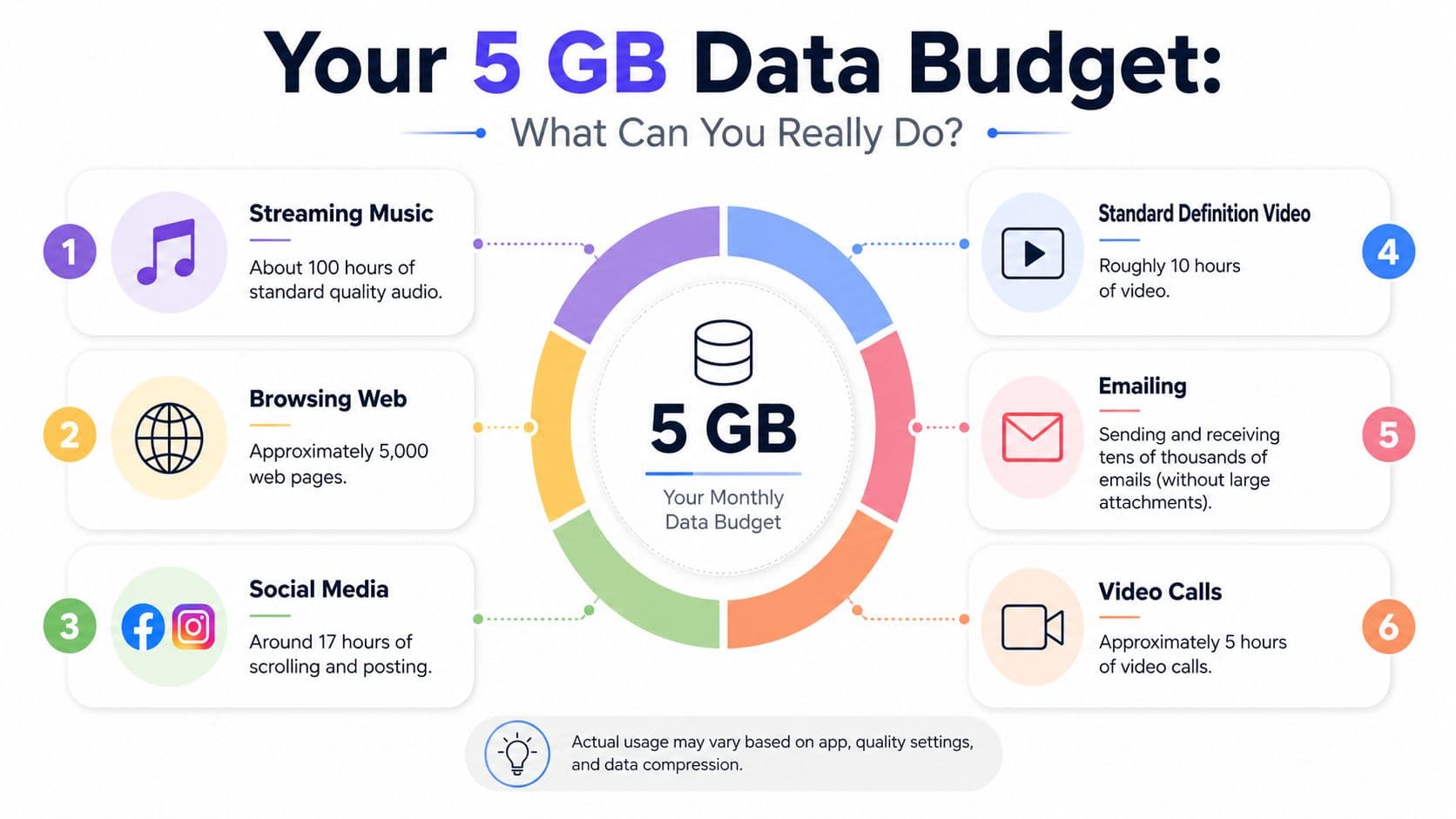
How 5 GB usually gets spent on a trip
5 GB equals about 5,120 MB, which is enough for moderate phone use but not for heavy streaming, based on this real-world 5 GB usage guide. The same guide shows the main trade-off clearly. Standard music streaming stretches a plan much further than video, while HD video can burn through data fast enough to wreck a small plan in a few evenings.
That matches what I see with travelers. Maps, messaging, email, boarding passes, restaurant searches, and the occasional ride-hailing app barely feel expensive. Evening video, social feeds full of autoplay clips, and hotspot use are what usually break the budget.
Another usage breakdown from uSwitch SAVE's 5GB guide points in the same direction. Browsing and audio are relatively manageable on 5 GB. Video quality is where your margin disappears.
If your phone is handling directions, bookings, and messages, 5 GB can last surprisingly well. If it starts replacing hotel Wi-Fi, it usually won't.
A quick planning table
Use this as a rough guide. Network conditions, app compression, background sync, and video quality settings will change the result.
| Activity (at standard quality) | Approximate Duration with 5 GB |
|---|---|
| Web browsing | About 83 hours |
| Music streaming | Roughly 115 to 120 hours |
| SD video | About 25 hours |
| HD video | About 6 to 7 hours |
| Full HD video | About 4 to 5 hours |
Those headline numbers help, but trip planning works better when you assign data to real tasks.
A 5 GB travel plan is often enough for a week or two if your priorities are practical: navigation every day, messaging throughout the day, some social media check-ins, and occasional music or podcast streaming. If you expect regular video calls, cloud backups, tethering for a laptop, or nightly Netflix, 5 GB is a small allowance.
Ken's Tech Tips on 5GB data plans also shows how wide the gap can be between light and heavy habits. Browsing and light social use can fit comfortably. High-resolution video can eat a large chunk of the plan in a single session.
What fits comfortably inside a 5 GB data budget
These are the trip activities that usually make sense on a 5 GB plan:
- Maps and navigation: checking routes, finding stations, using ride-hailing apps, and looking up places nearby
- Messaging: WhatsApp, iMessage, Telegram, Signal, and normal photo sharing
- Travel admin: email, booking confirmations, airline updates, digital tickets, and banking checks
- Light social media: posting a few photos, replying to messages, and brief feed checks
- Music and podcasts: best if you download over Wi-Fi first and stream only when needed
These are the habits that need more caution:
- HD or Full HD video streaming: one of the fastest ways to burn through a small plan
- Frequent video calls: manageable once in a while, risky if they're part of your daily routine
- Cloud backups and file sync: photo libraries and background uploads can consume a lot
- Laptop tethering: useful in an emergency, expensive as a regular habit
- Autoplay-heavy apps: short-form video feeds can drain data faster than travelers expect
A simple way to manage 5 GB is to give each activity a limit before the trip starts. For example, save most of your data for maps, transport, bookings, and backup communication, then treat streaming and hotspot use as occasional extras. That approach works better than checking your balance only after half the plan is gone.
If you want a clearer sense of how plan pricing and allowances are structured before you buy, RoamFly's guide to how travel data pricing works is useful for comparing what you're paying for versus what you'll use.
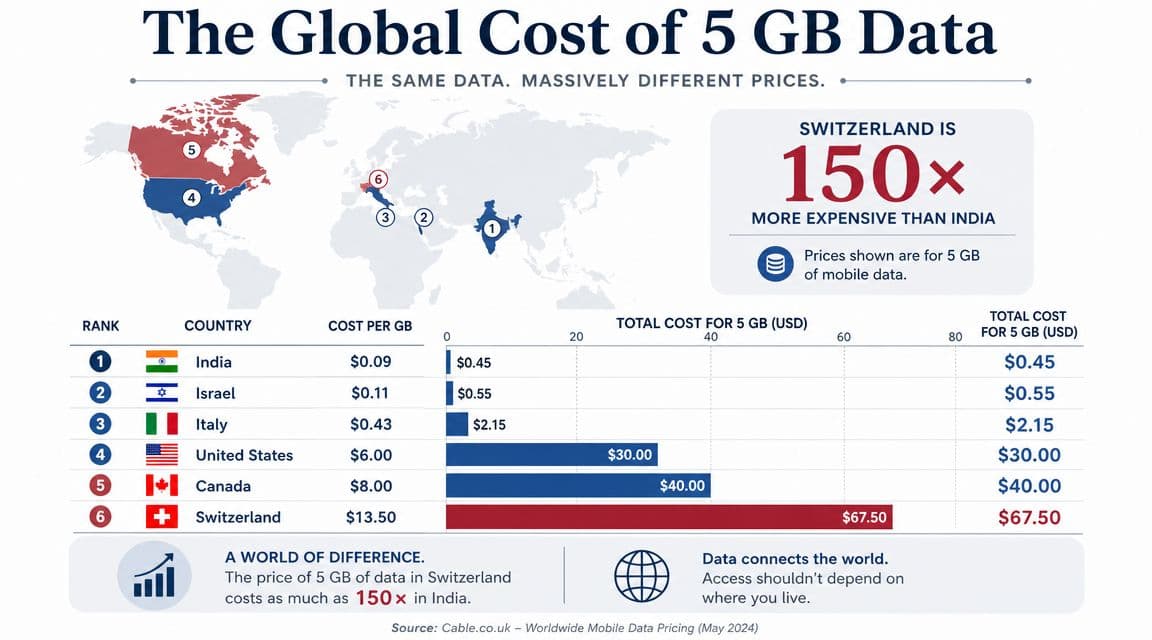
The Cost of 5 GB Around the World
“How much is 5 gigabytes of data” also has a second meaning. How much does it cost to buy?
Pricing changes a lot by country, carrier, and how you buy the plan. The important part for travelers isn't just the listed price. It's the total hassle cost. Airport SIM queues, passport registration, app activation friction, and surprise roaming charges all matter.
Three ways travelers usually get data
Local SIM cards can be a good fit if you're staying in one country long enough to make setup worth it. They often work well for longer trips, but they can be annoying after a flight when you just want to get online and call a car.
Home carrier roaming is the easiest option because you don't need to set up anything new. It's also the one that most often catches casual travelers off guard. Billing is rarely as simple as it looks in an ad, especially if the plan changes by destination or by day.
Travel eSIMs sit in the middle. You usually get faster setup than a local SIM and more predictable trip planning than roaming. Some travelers use them for a single country, others for a region. If you want to understand why pricing can differ between plan types, this short guide on how travel eSIM pricing is explained is useful.
What matters more than sticker price
For a first-time traveler, convenience often beats chasing the absolute lowest local rate. The cheap option on paper can become the annoying option in practice if you land late, can't register the SIM, or lose time troubleshooting APN settings.
A simple way to compare options is this:
| Option | Best for | Main trade-off |
|---|---|---|
| Local SIM | Longer stays in one country | Setup takes time and may require in-person purchase |
| Home carrier roaming | Maximum simplicity | Can be expensive or confusing |
| Travel eSIM | Fast setup before arrival | Needs an eSIM-compatible phone |
Buy for the first hour after landing, not just for the whole trip. If you can't get online at the airport, the cheapest plan wasn't really the cheapest.
I've seen travelers obsess over the price of a small data package and ignore the part that hurts: standing outside arrivals without maps, transport apps, or hotel messages. On short trips, paying a bit more for friction-free setup is often the better trade.
Smart Ways to Stretch Your 5 GB Data Plan
5 GB works better when you treat it like a trip budget. Spend it on the moments that matter most, like landing-day maps, ride apps, messages, and booking emails. Cut the waste before the trip starts, and the same plan feels a lot bigger.
Cut the biggest drains first
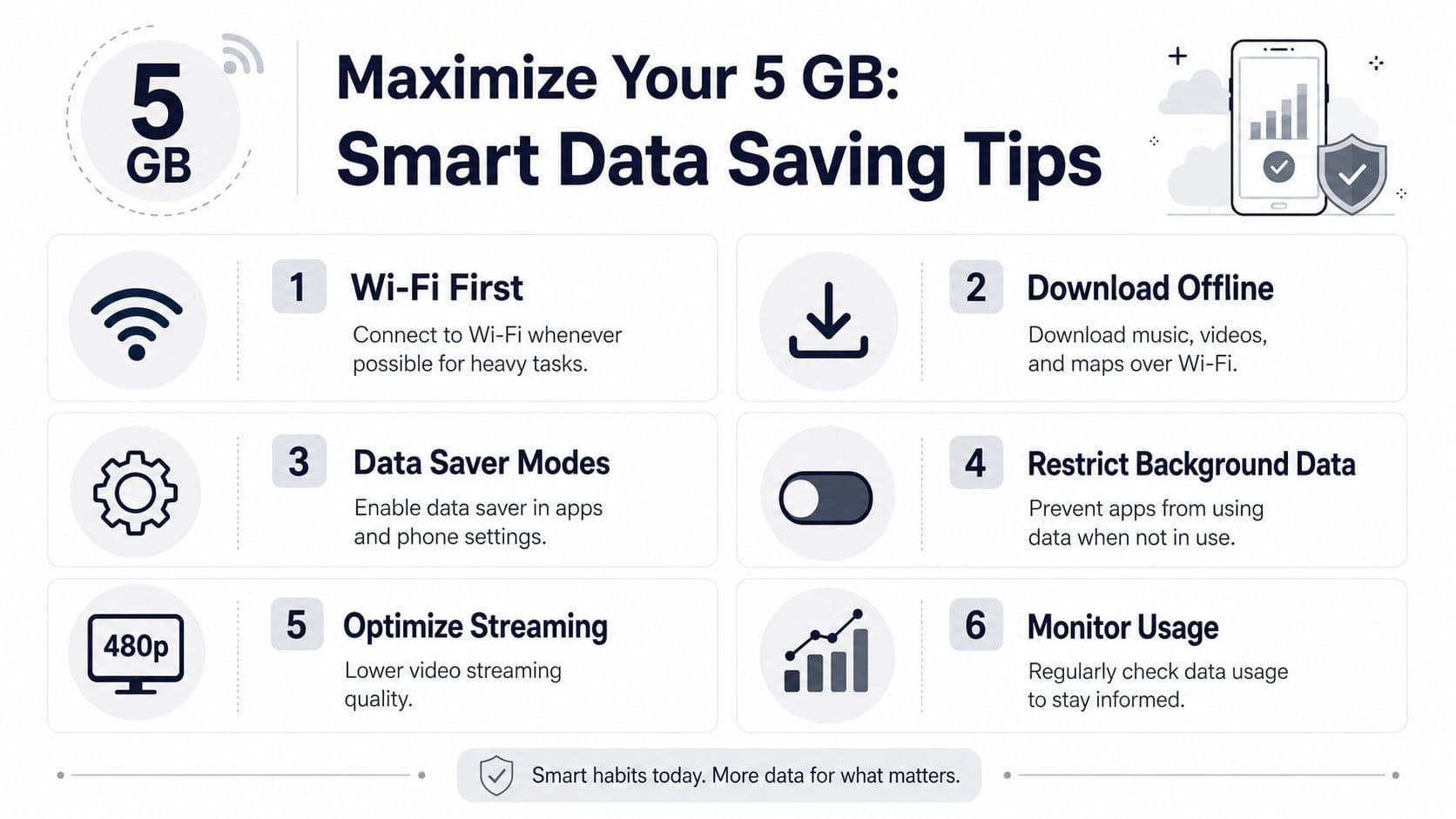
The fastest way to burn through a small travel plan is video. As noted earlier, higher video quality can shrink your usable time fast, so the smartest default is simple. Keep mobile streaming at standard quality and save HD for hotel or café Wi-Fi.
A few settings do more work than a dozen minor tweaks:
- Lower streaming quality: Set YouTube, Netflix, and social apps to standard quality on mobile data.
- Turn off auto-play: Instagram, Facebook, TikTok, and similar feeds can spend your data even when you only meant to scroll for a minute.
- Download before leaving Wi-Fi: Offline maps, playlists, podcasts, boarding passes, and translation packs should already be on your phone.
- Pause cloud backup on cellular: Photo syncing is useful, but it can chew through a travel data budget in the background.
If you only change one thing, change video quality.
Build your day around Wi-Fi checkpoints
Travelers usually run out of data in small, avoidable bursts. A few photos upload on the walk back. An app updates in the metro. A laptop connects to your hotspot and starts syncing files.
A better approach is to split your day in two. Use mobile data for live travel tasks outside, then use Wi-Fi for heavier admin once you're back at the hotel, apartment, airport lounge, or café.
That means:
- Use mobile data for active needs
Maps, messaging, transport apps, translation, and quick searches.
- Save heavy tasks for Wi-Fi
Photo uploads, app updates, file downloads, and streaming.
- Restrict background data
Turn off mobile access for apps you do not need while walking around.
- Be careful with tethering
One laptop session can wipe out a surprising chunk of a 5 GB plan.
- Know your next plan
If your trip has long transit days or work calls, knowing which plan you'll buy next is better than scrambling after you hit zero.
A simple traveler setup that usually works
Before a trip, I set the phone up for the kind of days that drain data. Long airport waits, moving between neighborhoods, and checking plans on the go.
Use this checklist:
- Maps offline
- Music or podcasts downloaded
- Photo backup paused on cellular
- App updates set to Wi-Fi only
- Social video auto-play disabled
- Video apps forced to lower quality
- Hotel address and tickets saved as screenshots
This setup does not make 5 GB unlimited. It does make your data budget last for useful trip moments instead of background nonsense.
How to Monitor Usage and Choose the Right Plan
A 5 GB travel plan lasts or disappears based on how you manage your data budget day by day. On a city trip, one traveler uses data for maps, tickets, and messages and gets through the week comfortably. Another burns through the same plan by day three with social video, cloud sync, and a couple of hotspot sessions.
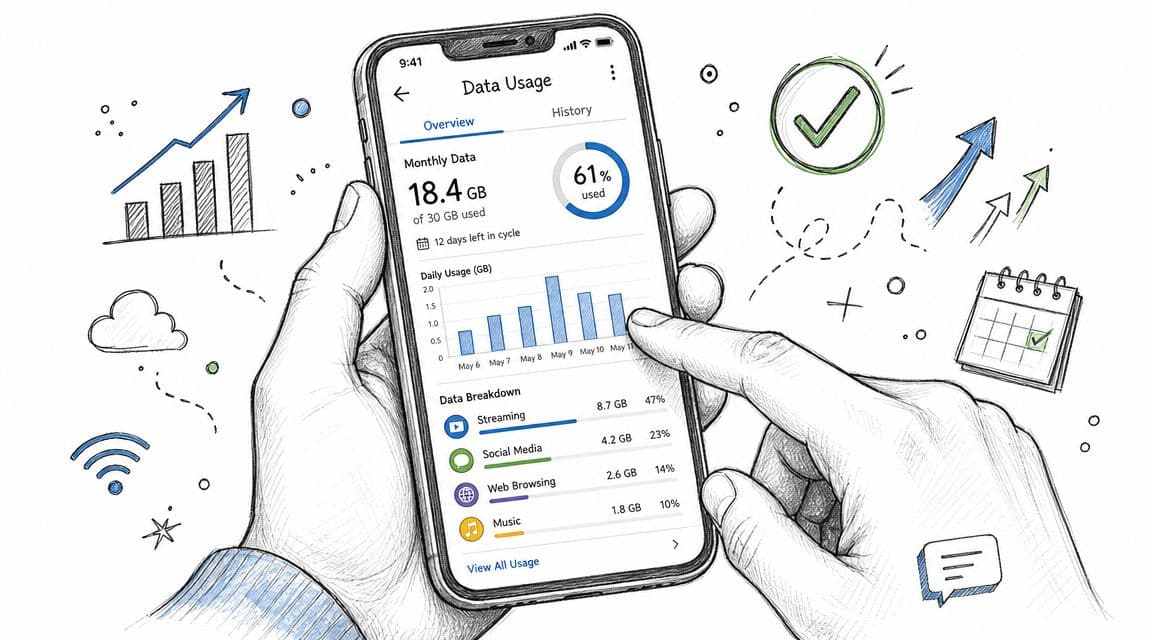
The practical move is to stop treating 5 GB like a vague allowance and start treating it like trip spending. Give your data to the moments that matter most: finding your hotel, booking the right train, calling a driver, checking a gate change, or fixing plans on the move.
How to check usage on your phone
On iPhone, open Settings > Mobile Data or Cellular and scroll through the app list. You will see which apps are using mobile data and which ones deserve to be cut off. If Instagram, Photos, or a cloud app is higher than expected, switch it off for cellular and save that usage for travel tasks.
On Android, open Settings > Network & Internet or Connections > Mobile data usage. Most phones show app-by-app totals and often let you set a warning or limit. That makes it much easier to catch a problem before your plan is half gone.
Check once each evening.
That habit works better than waiting until your carrier sends a low-data alert, especially on a trip where one heavy day can throw off the rest of your week.
How to choose the right plan for your trip style
5 GB fits travelers who use data with a purpose. That usually means maps, messaging, rideshare, translation, email, booking apps, and light browsing while out. If you have reliable hotel, apartment, or coworking Wi-Fi at night, 5 GB is often enough for a short trip.
5 GB can work for social media users, but only with limits. Posting photos is usually manageable. Regular Reels, TikTok scrolling, live uploads, and video stories are what push a small plan into the danger zone.
5 GB is usually too tight for laptop tethering or work-heavy travel. If you plan to hotspot your computer, join video calls, upload files, or stream during downtime, buy more upfront. It is usually cheaper and less stressful than trying to ration every day.
A simple rule I use is this: if mobile data is there to support the trip, 5 GB can be a smart buy. If mobile data is replacing home or office internet, go bigger.
If you start with 5 GB and your daily usage is climbing faster than expected, choose your next plan before you run out, so you're not hunting for one mid-trip.
Conclusion: Is 5 GB the Right Choice for Your Trip?
For the right traveler, 5 GB is a very practical travel plan.
It works best for short trips, city breaks, work travel with regular Wi-Fi access, and travelers who mainly need maps, messages, bookings, email, and the occasional social check-in. It doesn't work well for replacing home internet habits. If you want to stream video, tether a laptop, back up media constantly, or take frequent video calls, 5 GB will feel tight.
The simplest way to decide is to think in activities, not in gigabytes. If your phone is there to help you move through the trip, 5 GB is often enough. If your phone is also your office, your TV, and your hotspot, go bigger.
The smart move is to match the plan to the trip, not to the label on the package.
If you want a straightforward way to choose a travel data plan before you fly, RoamFly lets you compare eSIM options by destination and trip style so you can pick an amount that fits your actual usage instead of guessing.