
Ever wonder how does airplane wifi work? Our 2026 guide explains the tech behind in-flight internet, from satellite vs. ground systems to why speeds vary so
You're halfway through a flight, the cabin lights are dim, and someone a few rows ahead just sent a message, uploaded a photo, or answered a work email from somewhere far above the clouds. Then you try to connect and get a completely different experience. One flight feels almost normal. The next feels like the internet is moving through molasses.
That gap is what most people really want explained. Not just how does airplane WiFi work, but why it works well on one route and badly on another. The answer isn't magic. It's a mix of network design, aircraft hardware, route geography, and one very important fact: everyone on board is sharing the same pipe.
The Magic of Being Online at 35,000 Feet
Airplane internet still feels slightly unnatural. You're in a pressurized tube moving across the sky, yet your phone can sometimes pull in a boarding pass update, your laptop can sync email, and your chat app can ping a friend on the ground.
If you've ever looked out the window and thought, “How is any of this even possible?” you're asking the right question. The airplane isn't generating internet on its own. It's borrowing it from a network outside the aircraft, then redistributing that connection inside the cabin.
The part that confuses most travelers is that the airplane isn't in one stable place. It's moving fast, changing position constantly, and sometimes flying over cities, sometimes mountains, sometimes ocean, and sometimes areas with almost nothing below it. That's why airplane Wi-Fi behaves less like your home router and more like a mobile connection that has to keep reinventing itself during the flight.
Practical rule: In-flight internet isn't one single technology. It's a moving network with changing conditions, which is why consistency is harder than most passengers expect.
A good mental model is this: your phone or laptop is only seeing the final step. You connect to a familiar Wi-Fi name inside the cabin, but behind that simple login screen, the aircraft is doing something much harder. It has to maintain a live connection to the outside world while cruising at altitude, then share that limited link with everyone else who also wants to get online.
That's why your experience varies. The airplane may be over land or water. It may use older hardware or newer hardware. The flight may have a handful of connected passengers or a cabin full of people trying to stream, message, and sync cloud files at the same time.
Once you understand those moving parts, the mystery disappears.
The Two Main Ways You Get Wi-Fi in the Sky
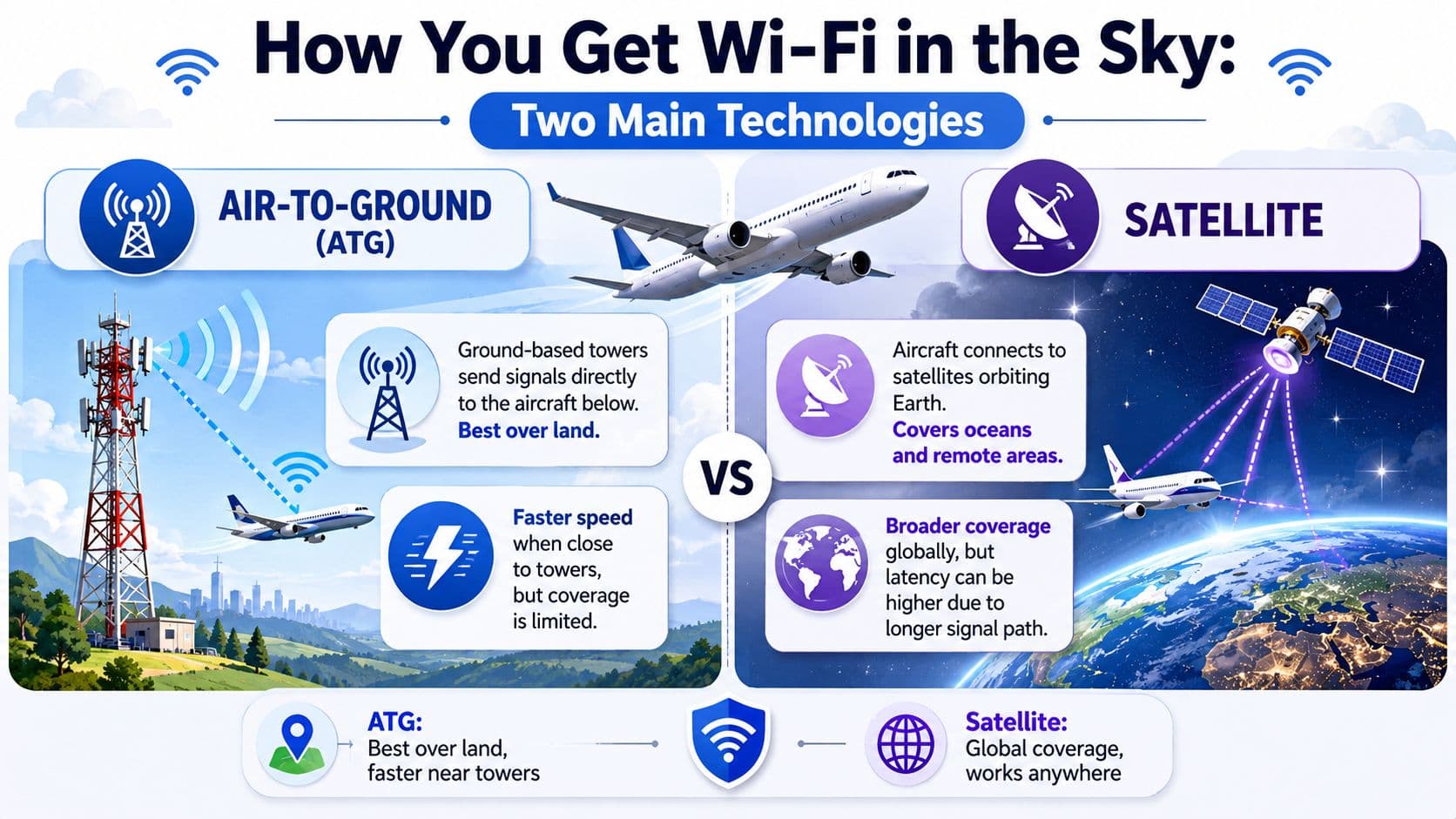
A passenger on a short flight from Chicago to Denver might get decent Wi-Fi for email, then have a miserable connection on a longer flight over the Atlantic. The difference often starts here. Airplanes usually reach the internet in one of two main ways: air-to-ground (ATG) or satellite. T-Mobile's overview of airplane Wi-Fi notes that ATG uses antennas on the underside of the aircraft to connect with ground towers, while satellite systems use antennas on top of the aircraft to connect with satellites overhead.
Near the start, it helps to see the two systems side by side.
Air-to-ground works like cell service for airplanes
ATG operates much like a mobile phone network, except the user is an aircraft instead of a car or a person holding a phone. As the plane moves, it connects to one ground tower, then another, handing off the link as it crosses the country.
That setup works well over land, especially on routes with dense tower coverage. It is one reason Wi-Fi on some domestic flights feels good enough for messaging, email, and light browsing. But the strength of ATG is also its weakness. It depends on the plane staying within reach of towers below.
Once the route heads over open ocean, sparsely populated terrain, or regions with limited infrastructure, ATG has less to work with. So if a domestic hop feels better than a remote or overwater route, the network design is often part of the explanation.
Satellite solves a different problem
Satellite systems send the connection upward first. The aircraft's top-mounted antenna talks to a satellite, and that satellite relays traffic to ground stations connected to the wider internet.
Satellites are essential for covering areas ground towers cannot. For long-haul flights, ocean crossings, and remote regions, satellite service is often the only practical option.
A short visual helps here too.
Satellite coverage, though, does not guarantee a perfect experience. The signal travels a much longer path, and the aircraft is still sharing one link with many passengers. Your device compatibility can matter too, especially on international trips with different onboard portals and access methods, which is why some travelers check whether their phone or eSIM setup is compatible with travel connectivity tools before they fly.
Why this changes your real flight experience
The practical question is not just which system the plane uses. It is what that system is good at, where it struggles, and how many people are trying to use it at the same time.
ATG often feels constrained faster because it was built around tower coverage over land. Satellite usually reaches more places and often supports a better experience on modern aircraft, but it still has limits when a full cabin starts streaming, syncing files, and refreshing social feeds all at once.
A simple comparison makes the difference easier to spot:
| Connection type | Best use case | Coverage pattern | Shared capacity effect |
|---|---|---|---|
| **ATG** | Flights over land | Stronger where tower coverage exists | Can feel tight quickly when many people connect |
| **Satellite** | Long-haul, ocean, remote regions | Broader geographic reach | Usually handles demand better, but the cabin still shares one link |
If you have ever had solid Wi-Fi on one flight and frustrating Wi-Fi on the next, the route, the aircraft hardware, and the connection method probably mattered as much as the airline itself.
So the useful answer to how airplane WiFi works is not only “through towers or satellites.” It is that each method shapes the experience you feel in your seat. It affects where service is available, how much capacity the aircraft can reach, and why one flight seems surprisingly usable while the next struggles to load a page.
From the Antenna to Your Device Inside the Plane
Once the airplane has internet from outside, a second system takes over inside the cabin. This is the part passengers interact with directly, even if they never see most of the hardware.
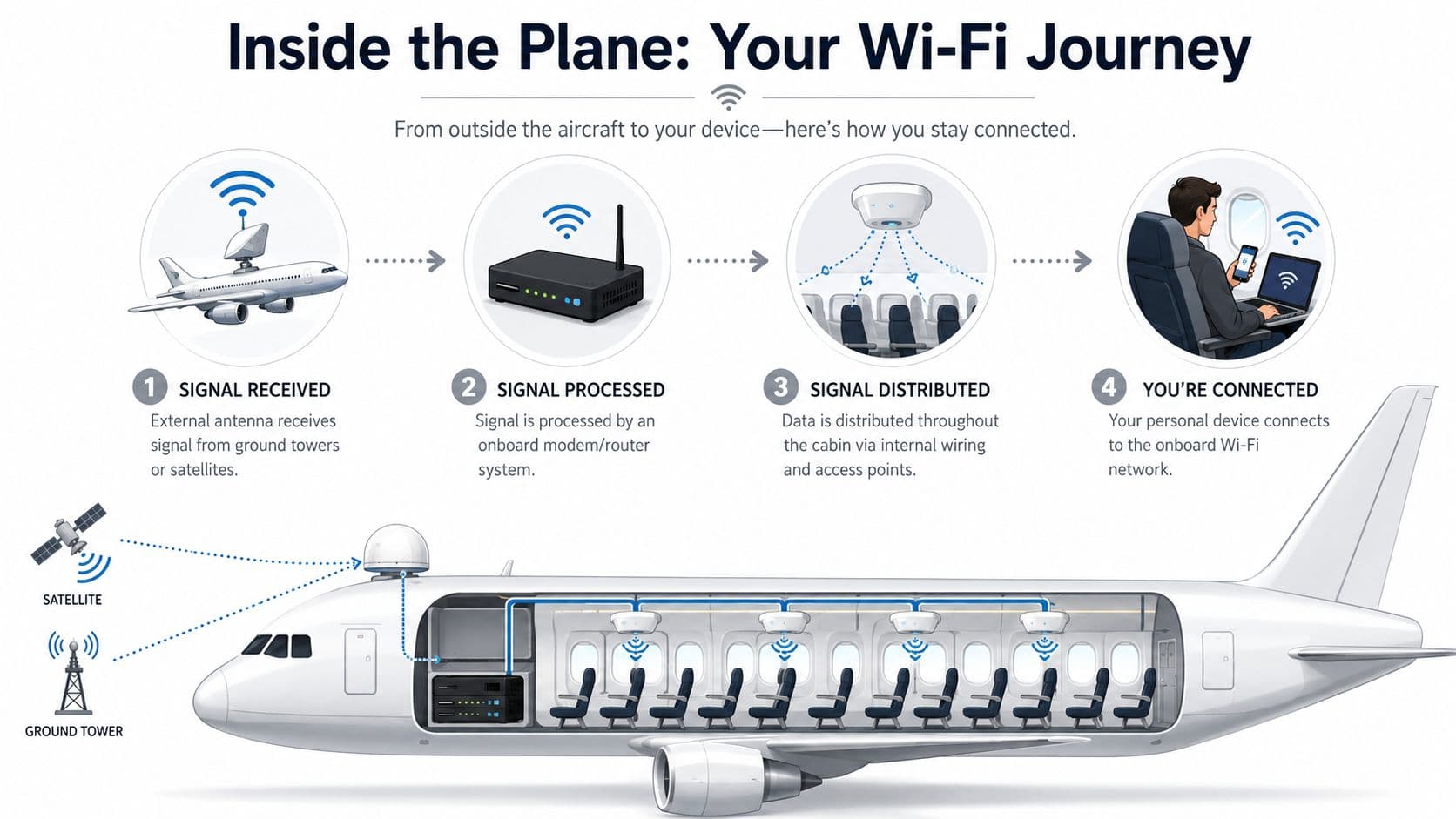
The airplane first has to catch the signal
The signal reaches the aircraft through its external antenna system. On some aircraft, you can spot a raised fairing on the fuselage that houses parts of the satellite equipment. In plain terms, that structure protects the gear while letting it communicate with the network outside.
Inside the aircraft, an onboard modem or router processes that incoming link. Think of it as the airplane's network brain. It takes the external connection and turns it into something the cabin can use.
The cabin network works like a flying office
From there, the aircraft distributes internet through internal wiring and wireless access points placed around the cabin. Those access points create the onboard network name you see on your phone or laptop. In other words, the plane becomes a flying Wi-Fi hotspot.
That's why connecting on a flight feels familiar. The hard part happened before you even opened your device. By the time you tap the network name, the airplane has already done the much more difficult job of talking to towers or satellites outside.
A stripped-down path looks like this:
- External link arrives: The aircraft receives internet from ATG or satellite.
- Onboard equipment translates it: A modem/router manages and routes the signal.
- Cabin hardware spreads it: Access points distribute Wi-Fi through the aircraft.
- Your device joins: Your laptop or phone connects like it would in a hotel or café.
If you're unsure whether your phone supports the right setup for travel after landing, RoamFly's device compatibility checker is a practical way to confirm support before your trip.
The passenger only sees one login screen. The aircraft is really running two networks at once: one to reach the internet outside, and one to share it inside.
That inside network can also affect performance in subtle ways. If you're sitting far from an access point, or if the cabin hardware is older, your local wireless link inside the aircraft may not feel as clean as the external connection itself. That's another reason two flights can feel different even before you consider route or satellite coverage.
Why Is Airplane Wi-Fi Sometimes So Slow
You open your laptop after takeoff, the login page loads, and for a few minutes everything feels normal. Then the cabin settles in, more people connect, someone starts syncing photos, someone else tries to stream video, and the connection suddenly feels like a traffic jam at 35,000 feet.
Passenger complaints about in-flight internet often come down to one word: shared.
Airplane Wi-Fi works like a public hotspot with a very long backhaul. Everyone in the cabin is drawing from the same outside connection, and that connection is usually much more limited than what you have at home or in an office. The result is predictable. Performance depends less on whether the plane has Wi-Fi at all, and more on how much total capacity the aircraft has, how many people are using it, and what they are trying to do.

One connection is shared by the whole cabin
As noted earlier, some aircraft have far less total bandwidth available than others. That is the first big reason one flight feels fine and the next feels unusable, even before you factor in the airline, the seat, or the price you paid.
A road comparison helps. The internet link to the aircraft is the highway into town. Passenger devices are all the cars trying to use it at once. Text messages and simple emails are scooters. Cloud backups, software updates, and video streams are freight trucks. A few trucks can slow everyone behind them. A cabin full of them can make the whole system feel stuck.
This also explains a common frustration. A connection can look good early in the flight, then get worse without any obvious warning. The system did not necessarily break. More often, demand caught up with supply.
The route and the aircraft often matter more than the airline name
Travelers often assume Wi-Fi quality is tied mainly to the airline brand. In practice, the aircraft and the route usually explain more.
An older narrow-body flying domestic hops may have one setup. A newer long-haul aircraft crossing an ocean may have another. Two planes painted in the same airline colors can deliver very different results because they are using different antennas, different service providers, or different generations of onboard equipment.
Geography matters too. Coverage is easier to maintain in some parts of the world than in others, and some systems handle certain routes better than others. If the aircraft is changing beams, switching coverage areas, or dealing with congestion on a busy corridor, you may feel that as lag, buffering, or a login page that takes forever to refresh.
Small tasks usually work first. Heavy tasks fail first.
That pattern is the practical key to understanding airplane Wi-Fi.
The network is usually good at low-bandwidth jobs because they ask for short bursts of data. Messaging, email, and simple web pages can often slip through even when the link is crowded. Large uploads and live video need a steadier, wider pipe. Shared aircraft networks often struggle to provide that consistently, especially once dozens of passengers are online.
| Task | Usually more realistic | Usually less reliable |
|---|---|---|
| **Messaging apps** | Rarely the problem | |
| **Email and basic browsing** | Often | Can slow during busy periods |
| **Cloud sync and large uploads** | Sometimes | Often frustrating |
| **Video calls and heavy streaming** | Depends heavily on the flight | Frequently inconsistent |
A simple way to set expectations is to match your task to the environment. If you only need to reply to messages, review a document, or read the news, in-flight Wi-Fi may be perfectly usable. If you need to upload a large presentation or join a stable video meeting, you are asking a shared airborne network to behave like home broadband.
If you want a better feel for how different online tasks consume bandwidth, this guide to what 5 gigabytes of data looks like in everyday use gives helpful real-world examples.
Judge airplane Wi-Fi by the job you need it to do, not by whether it can handle every job you do on the ground.
That mindset explains the inconsistent user experience better than any marketing label. Good in-flight Wi-Fi is not just about having a signal. It is about whether that particular aircraft, on that particular route, at that particular moment, has enough shared capacity for the task you care about.
How to Connect and What to Expect to Pay in 2026
Connecting is usually easy. Predicting whether access is free, paid, restricted, or tied to your membership status is the harder part.
The connection process is usually simple
On most Wi-Fi-equipped flights, the steps are familiar:
- Turn on airplane mode: Then switch Wi-Fi back on manually.
- Join the onboard network: The airline usually broadcasts a clearly named cabin network.
- Open a browser: A portal page often appears automatically. If it doesn't, opening a browser usually triggers it.
- Choose an access option: You may see free messaging, full internet, or a sign-in option tied to your account or loyalty profile.
- Authenticate if required: Some airlines ask for a booking detail, email address, or loyalty login.
If you're trying to estimate what onboard access might cover compared with normal mobile data use, this guide on what 5 gigabytes of data looks like in practice can help you think through real tasks like browsing, messaging, and media use.
Free Wi-Fi is more common, but rules vary
The old assumption that airplane Wi-Fi always costs extra isn't as reliable anymore. Wikipedia's inflight connectivity overview notes that a growing number of major carriers, including Delta, Emirates, Singapore Airlines, Qatar Airways, Lufthansa, Air France, Southwest, and American Airlines, now offer complimentary Wi-Fi for all passengers on some routes or as a loyalty perk.
The important word is some.
Access can depend on the specific route, aircraft, class of service, or whether you're logged into the airline's membership program. That means two passengers on the same carrier may see different options, and the same passenger may see different policies on different flights.
A few practical habits help:
- Check before boarding: Airline apps and booking pages often show whether your flight has Wi-Fi and any access conditions.
- Look for loyalty perks: Even basic membership can provide free access on some airlines.
- Expect aircraft-specific variation: Not every plane in a fleet is configured the same way.
- Plan for after landing too: In-flight internet ends when the flight ends.
For that handoff after arrival, a local data option such as Brazil eSIM, Unlimited / 1 day can make sense if you need mobile data as soon as you land in Brazil.
Staying Safe and Productive on Public In-Flight Networks
Airplane Wi-Fi may feel more controlled than airport or café Wi-Fi, but for your device, it's still a public network. That means the security mindset should be the same.
Treat airplane Wi-Fi like coffee shop Wi-Fi
If you handle work documents, client messages, account logins, or financial information, use a VPN. This is not optional for anyone doing sensitive work in transit. A VPN encrypts your traffic and lowers the risk that someone on the same network can observe more than they should.
Other habits matter too:
- Use HTTPS sites only: Modern browsers help, but you should still notice where you're logging in.
- Avoid sensitive admin tasks: Changing financial settings or accessing high-risk dashboards can wait.
- Turn off auto-join later: Your device shouldn't keep reconnecting to unfamiliar public networks after the flight.
- Log out when you're done: Especially on shared portals and browser sessions.
Public Wi-Fi in the sky carries the same basic risks as public Wi-Fi on the ground. Altitude doesn't make it private.
Work with the network, not against it
If you need to be productive, the smartest move is to reduce how much you ask from the connection.
Download large files before boarding. Enable offline mode in tools like docs, notes, and cloud drives. Prioritize email, research, editing, or writing over high-bandwidth tasks such as video calls and bulk uploads.
A simple preflight routine helps remote workers more than any clever trick:
- Prepare offline files: Cache presentations, briefs, and reference documents before takeoff.
- Silence background sync: Cloud photo uploads and automatic backups can eat the connection.
- Choose low-bandwidth work: Drafting, reviewing, and replying usually go much better than live collaboration.
- Have a ground plan: How RoamFly works explains one way travelers can set up eSIM data for connectivity before takeoff and after landing, when mobile service often matters more than onboard internet.
If your job depends on staying connected, think of airplane Wi-Fi as a bonus layer, not your only layer.
The Future of In-Flight Connectivity Is in Low Earth Orbit
The next big change in airplane internet comes from Low Earth Orbit, or LEO, satellites. These satellites operate much closer to Earth than older high-altitude satellite systems, which matters because the signal doesn't have to travel as far.
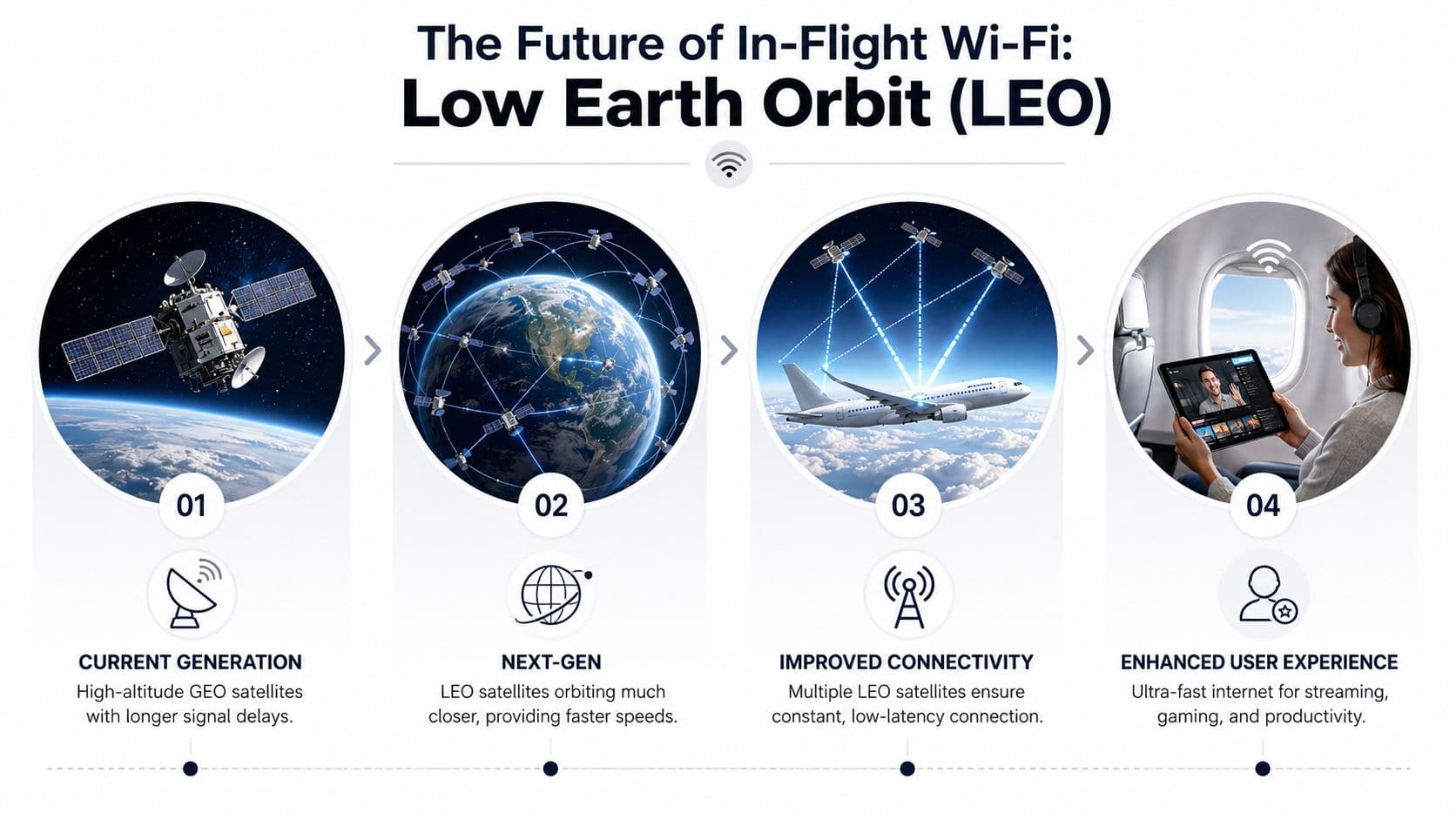
Why lower satellites help
When the distance drops, delay drops too. That improves responsiveness, which is the part passengers often describe as “lag.” Pages can feel snappier, apps can respond faster, and real-time tasks become more practical.
LEO systems also fit the needs of moving aircraft well because they're designed as constellations rather than relying on a single distant point in the sky. That can support steadier service as planes travel across large areas.
What that means for passengers
For travelers, this shift could narrow the gap between “airplane internet” and “normal internet.” Not perfectly, and not on every route right away, but enough to change expectations.
The most important takeaway is simple. The frustrating inconsistency people associate with in-flight Wi-Fi isn't permanent. As airlines upgrade aircraft and adopt newer satellite systems, the cabin experience should become more usable for the kinds of tasks passengers increasingly expect to do in the air.
That doesn't mean every future flight will feel like fiber at home. It does mean the answer to how does airplane WiFi work is becoming less about patching together a fragile signal and more about delivering a network that can keep up with modern travel.
If you want a smoother connection before takeoff and right after landing, RoamFly offers travel eSIMs that let you get online without swapping physical SIM cards. For remote workers and frequent flyers, that can be a practical complement to in-flight Wi-Fi when the airplane network is limited or unavailable.