
Get instant internet with an eSIM for UK travel. Our 2026 guide covers compatibility, activation, plans, and tips to stay connected hassle-free in the UK.
You've probably got the big trip details sorted already. Flights booked, hotel saved, maybe a list of pubs, museums, or day trips pinned in Google Maps. Then the annoying question shows up right before departure. How are you going to stay connected in the UK without paying painful roaming fees or hunting for a plastic SIM after landing?
That's where an eSIM for the UK makes travel much easier. You can set it up before you leave, switch it on when you arrive, and get straight to maps, messages, banking apps, ride-hailing, and email. No tiny SIM tray. No airport kiosk scramble. No guessing whether your home carrier is charging you for roaming.
The UK has become a major early adopter of eSIM technology, and the broader ecosystem is already strong for travelers. By 2023, 231 eSIM-enabled consumer devices were available globally, and nearly 400 mobile operators offered eSIM services, according to Statista's eSIM market overview. That matters because it means the hardware and network support are already in place for most travelers heading to Britain.
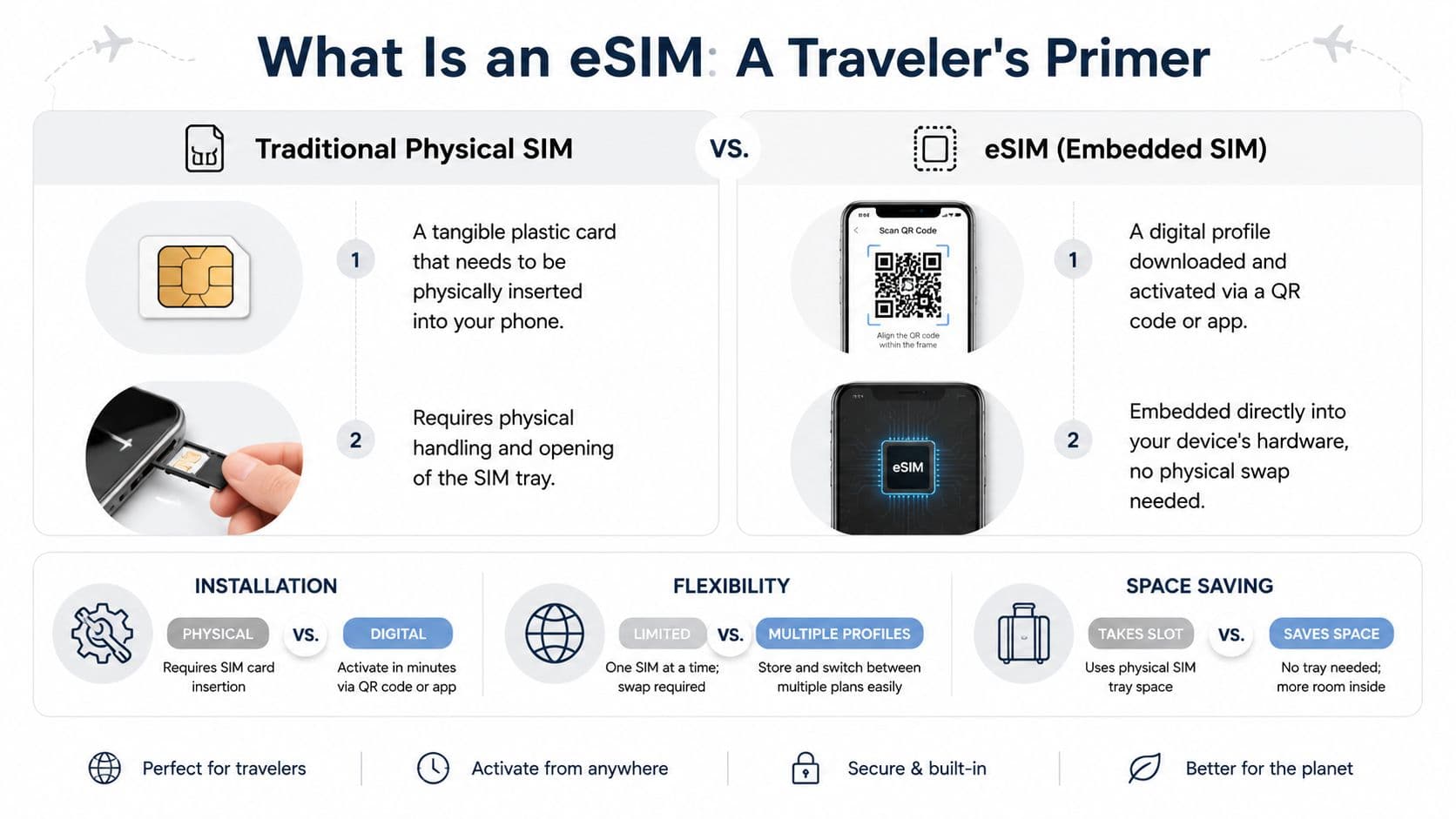
What Is an eSIM A Traveler's Primer
You land in the UK, switch off airplane mode, and want maps, train tickets, and messages working before you even reach passport control. An eSIM makes that possible without hunting for a kiosk or swapping a tiny plastic card at the airport.
An eSIM is a SIM built into your phone. Instead of inserting a physical card, you install a mobile plan digitally, usually by scanning a QR code or using an app. Your phone stores that plan and connects to a local network the same way it would with a regular SIM.
For travelers, the practical benefit is simple. You can set up your UK data line before departure, then turn it on when you arrive. Your home SIM often stays in place, which lowers the chance of losing it in a hotel room, airport lounge, or café.
Why travelers prefer eSIMs
Many first-time UK visitors assume eSIM setup is technical. In practice, it usually feels closer to installing a boarding pass than changing phone hardware. You follow a few prompts, label the line, and decide which SIM handles data.
That changes the travel workflow in useful ways:
- No physical SIM swap: your main SIM can stay in the phone.
- Setup before departure: install while you still have reliable Wi-Fi at home.
- Faster arrival: you can get directions, book a ride, or check train changes soon after landing.
- Dual-SIM flexibility: your home line can remain available for texts or banking codes while the UK eSIM handles data.
Practical rule: Let the UK eSIM handle mobile data. Keep your home SIM active only if you need one-time passcodes, incoming texts, or occasional calls.
Why eSIMs are especially useful in the UK
The UK is a good place to start using eSIM because the network support is already there across major carriers. The result is that travelers can usually get connected without visiting a shop or waiting in line after a flight.
It also helps you avoid a common budget mistake. Many visitors assume their home roaming plan will be good enough, then discover limits, day passes, or slower speeds after arrival. A UK eSIM gives you a local data setup from the start, which is often easier to control during the trip.
The details matter here. Some UK travel eSIMs are data-only. Some route service through local networks with roaming partners. Some need an APN entered manually if data does not start right away. Those small setup differences are easy to miss, and they affect whether a plan feels effortless or frustrating.
If you want to avoid buying the wrong plan, it also helps to check whether your phone supports eSIM before you pay. A quick device compatibility check for eSIM-supported phones can save time.
What an eSIM does and doesn't do
An eSIM gives your phone access to a mobile network. For many travel plans, that mainly means data. Calls and texts may be included, but many travelers use WhatsApp, FaceTime, Telegram, Zoom, and email for most communication anyway.
A helpful way to frame it is this. For a short holiday, your eSIM is usually your internet connection for maps, bookings, and messaging. For a longer work trip, it becomes part of a bigger setup that may include dual-SIM choices, hotspot use, APN checks, and fair-use limits.
Once that clicks, the rest gets much easier. You are not buying a mysterious new service. You are choosing how your phone will connect in the UK, and how to set it up without wasting time on arrival.
Is Your Device Ready for a UK eSIM
Before you shop for plans, check two things. Is your phone eSIM-compatible? And is it carrier-independent? If either answer is no, the plan won't help much.
How to check on iPhone and Android
On an iPhone, go to Settings, then Cellular or Mobile Data. Look for an option such as Add eSIM or Add Cellular Plan. If you see it, that's a good sign your device supports eSIM.
On Android, the wording varies by brand, but a common path is Settings, then Connections or Network & Internet, then SIM Manager or Mobile Network. Look for Add eSIM.
If you want a second check before buying, use a dedicated device compatibility checker for eSIM-supported phones.
The unlocked phone part trips people up
A phone can support eSIM and still reject a travel plan if it's carrier-locked. That means your phone is restricted to the network you bought it from.
Here's the practical version. If your current carrier sold you the phone on a contract, installment plan, or bundle, ask them whether the device is able to be used with international eSIMs. Don't assume. Ask directly.
A quick checklist:
- Find the eSIM option in settings.
- Confirm the exact phone model.
- Ask your home carrier if the phone is free of carrier restrictions.
- Do this before travel day. Airport Wi-Fi is not where you want to discover a lock.
If your carrier says the phone is locked, ask what steps are required to unlock it. Some carriers need account verification or a waiting period.
A small warning about older habits
Some travelers think dual SIM means they need two physical SIM slots. Not anymore. Many newer phones support one physical SIM plus one eSIM, and some support multiple eSIM profiles. You still need to check your own device, but don't rule it out just because you only see one tray.
If your phone passes the compatibility and carrier freedom check, you're ready for the important part. Choosing a plan that matches the way you travel.
Choosing the Right UK eSIM Plan for Your Trip
Most guides tend to get lazy. They list providers, throw around “unlimited,” and leave you to guess. A better way is to choose by trip shape. How long are you staying, how much data do you use, and are you leaving the UK during the trip?
Start with the type of trip
If your whole trip is in Britain, a local UK plan is usually the simplest option. If you're taking the Eurostar to Paris or adding Dublin, Amsterdam, or another nearby stop, a regional Europe plan can be more convenient. If the UK is only one stop on a bigger journey, a global plan can save you from installing a new eSIM every few days.
Here's a quick comparison.
| Plan Type | Best For | Coverage | Cost-Effectiveness |
|---|---|---|---|
| Local UK plan | Travelers staying only in the UK | United Kingdom | Usually the most efficient if Britain is your only stop |
| Regional plan | Travelers combining the UK with nearby European countries | UK plus multiple countries in one region | Often worth it when you don't want to switch plans mid-trip |
| Global plan | Multi-country trips across regions | Broad international coverage | Best for convenience, not always the cheapest per destination |
Use a simple decision tree
Ask yourself these questions in order:
- Are you staying only in the UK? If yes, start with a local UK eSIM.
- Are you crossing borders during the same trip? If yes, compare a regional plan against buying separate local plans.
- Will you work remotely, hotspot, or stream often? If yes, lean toward a larger allowance and read the fair-use terms.
- Do you need a phone number? Many travelers don't.
A lot of people overbuy. They imagine they'll need local calling, but then use WhatsApp the entire time. Others underbuy because they forget how much data maps, cloud backups, short video uploads, and hotspot use can consume.
Fair use matters more than the headline
This is one of the most overlooked parts of buying an eSIM for the UK. Some prepaid products can slow down after certain usage patterns, especially for longer stays or repeated short-term purchases. Travelers should be aware that major UK operators are tightening fair-use policies, which can lead to speed throttling on some prepaid eSIM products, according to Holafly's discussion of UK eSIM fair-use issues.
That doesn't mean those plans are bad. It means you should match the plan to your behavior.
- Weekend city break: A straightforward data plan is often enough.
- Two-week holiday with lots of navigation and social media: Mid-range data tends to be safer than a tiny plan.
- Digital nomad or frequent repeat visitor: Read the terms for throttling, repurchase rules, and hotspot treatment.
One practical way to compare options
When you're browsing plans, compare them in this order:
- Coverage area
UK only, UK plus Europe, or global.
- Plan duration
Make sure the validity matches your trip, not just your arrival date.
- Data style
Fixed allowance or unlimited-style plan with fair-use limits.
- Network quality
Urban travel, rural travel, and work-heavy travel don't all need the same thing.
- Top-up path
If you run out, can you add more data without reinstalling anything?
If you want a broader overview of plan formats and traveler use cases, this guide to UK prepaid eSIM data plans for travelers is a helpful reference point.
How to Buy and Activate Your UK eSIM
Once you've chosen a plan, the setup is usually much less dramatic than people expect. Buy online, receive the details by email or app, install the eSIM, then activate it when you're ready to use it in the UK.
Buying before you fly
The easiest move is to buy your eSIM while you're still at home and connected to stable Wi-Fi. That gives you time to read the instructions and fix anything calmly.
You can buy directly from travel eSIM providers. For example, RoamFly's eSIM setup guide walks through the installation process and how activation works after purchase.
A good rule is this: install early, activate at the right moment. Many travelers install the eSIM before departure but wait to switch it on until arrival so the plan lines up better with the trip.
Installing with a QR code
This is the most common method. Your provider sends a QR code by email or displays it in your account area.
On iPhone, the path is usually:
- Open Settings
- Tap Cellular or Mobile Data
- Tap Add eSIM or Add Cellular Plan
- Scan the QR code
- Follow the prompts to label the line
On Android, it's usually similar:
- Open Settings
- Go to Connections, SIM Manager, or Network & Internet
- Tap Add eSIM
- Scan the QR code
- Confirm installation
If you're using the same phone to display the QR code, use the manual setup details provided by the seller or open the QR code on a second screen such as a laptop or tablet.
Installing through an app
Some providers let you skip the QR code and install directly through their app. This is often the easiest path for travelers who don't want to bounce between email and settings menus.
The app usually handles:
- downloading the profile
- attaching it to your device
- showing plan status
- offering top-ups later
Install the eSIM while you still have dependable internet. Don't wait until the aircraft door opens and everyone is fighting for signal.
The two settings that matter after installation
After the profile is on your phone, check these before you leave:
- Label the line clearly: Call it “UK eSIM” or “Travel Data.”
- Leave your home line named something obvious: “Primary” or “Home SIM” works well.
Then, once you land, you can choose which line handles mobile data and which one stays active for calls or texts. That makes the next part, managing your setup inside the UK, much smoother.
Pro Tips for Managing Your eSIM in the UK
Installing the eSIM is only half the story. The smoother experience comes from how you manage it once your phone has two lines available.
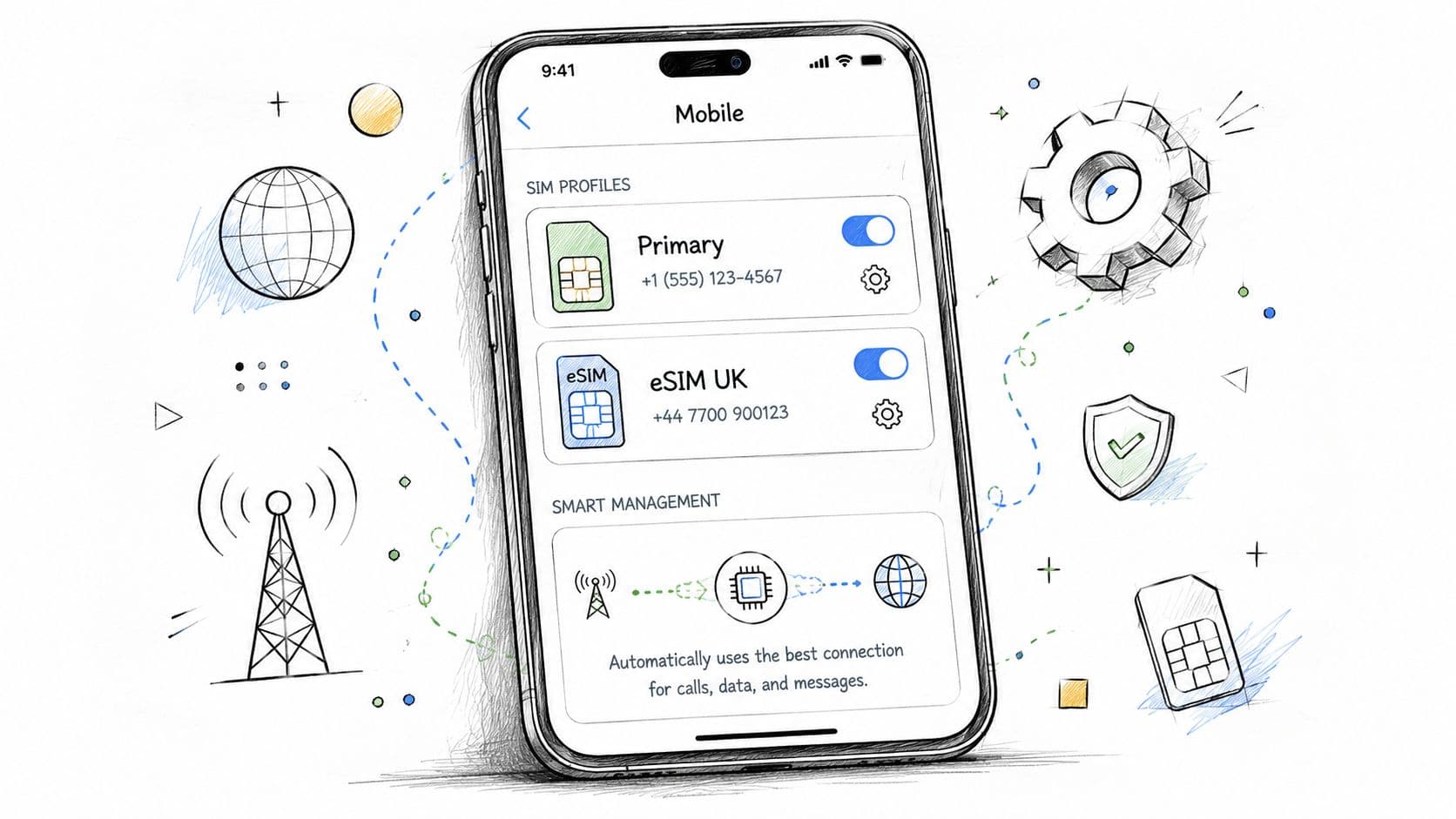
Set your phone up before landing
If you want to keep your home number reachable for texts or two-factor codes, keep that line on but make sure mobile data is assigned to the UK eSIM. That's the setting that protects you from accidental roaming.
A clean setup looks like this:
- Primary line for calls and texts: Your home SIM, only if needed.
- Travel line for data: Your UK eSIM.
- Cellular data switching: Turn it off if your phone tends to jump between lines automatically.
- Roaming on the travel line: Enable it if your provider requires it for the plan to work.
This sounds fiddly, but once labeled properly, it takes less effort to manage.
Check APN and network behavior
APN stands for Access Point Name. In plain language, it's the network setting that tells your phone how to connect for mobile data. Many eSIMs configure this automatically. Some don't.
If your eSIM is installed but data won't load, APN is one of the first things to check. Your provider should list the exact APN value in the setup email or app. Enter it carefully. One typo can stop data from working.
Another under-discussed point is network quality during movement. For optimal performance, a UK eSIM should connect to a dense network like EE or Three, and poorly optimized eSIMs can add 100 to 300 ms of latency during handovers, which can disrupt video calls, according to Saily's UK eSIM technical notes.
That matters if you're:
- joining Zoom or Teams calls from trains
- using VoIP heavily
- tethering a laptop for remote work
- moving between busy urban areas
Field note: If your calls stutter while the signal bars look fine, the issue might be handover behavior or network switching, not raw coverage.
A practical fix is to manually select the network if your provider allows it, especially if your phone keeps bouncing between partners.
Watch data use and 5G expectations
Open your phone's mobile data screen and reset the usage counter at the start of the trip if that option exists. That gives you a realistic view of how much data maps, Instagram uploads, tethering, and cloud sync are using.
If you rely on mobile data for work, also turn off background updates for non-essential apps. Travelers often blame the eSIM when the underlying cause is that photos, backups, and app stores consumed a chunk of the plan overnight.
eSIM Strategies for Different UK Travel Styles
The right eSIM for the UK depends less on the country and more on the way you travel.
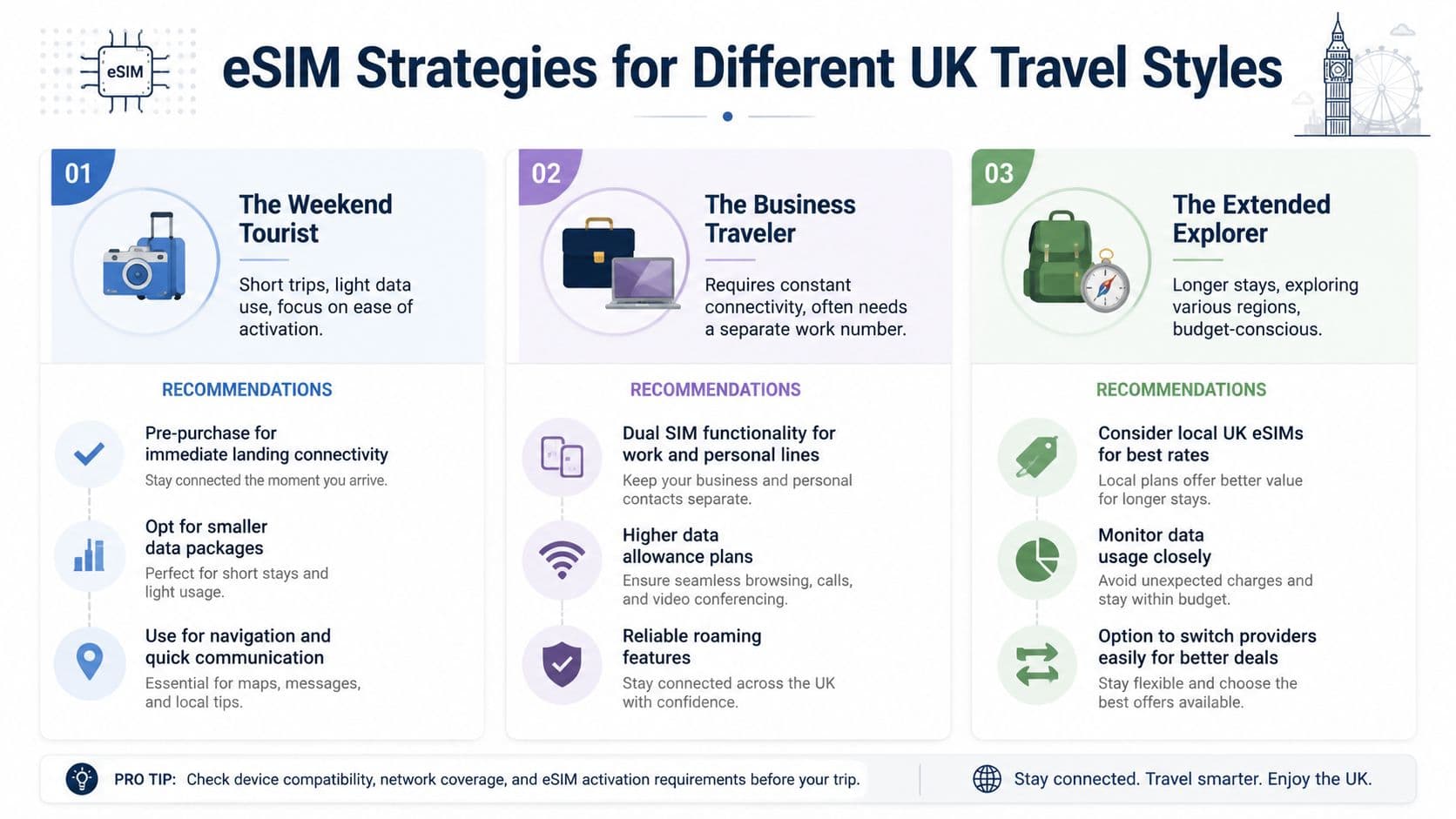
The weekend tourist
You fly into London on Friday, spend a few days moving between the Tube, Google Maps, restaurant bookings, and museum tickets, then head home. You don't need a complicated plan. You need instant data, easy setup, and no surprise roaming.
A simple data-first UK eSIM usually fits this kind of trip. Keep your home SIM active only if you need incoming texts. Turn off data on your home line. Use the travel line for maps, ride apps, messaging, and photos.
The biggest win here is convenience. You land, switch the line on, and start navigating.
The remote worker staying longer
Now take a different traveler. You're based in Manchester for a while, taking calls, using cloud tools, tethering a laptop occasionally, and maybe making a few trips around the country. That setup needs more than a cheap short-stay plan.
For this style of trip, focus on:
- larger data allowances or easy top-ups
- clear fair-use terms
- stable network access
- good dual-SIM management for work and personal lines
This is also where future-proofing matters. The UK is moving rapidly toward an eSIM-only environment, with major operators planning to significantly reduce or eliminate physical SIMs around 2026, according to Cellesim's report on the UK's projected eSIM-only transition. For frequent visitors, learning this workflow now is practical, not optional.
One more thing. Longer stays expose the fine print. If you expect to buy repeated short-term plans over time, read the fair-use and repurchase terms carefully before you commit.
Troubleshooting Common UK eSIM Issues
Most UK eSIM problems fall into one of three buckets. The profile did not install cleanly, the network attached but data is being limited, or your phone is switching between lines in a way that is easy to miss. The fastest fix comes from matching the symptom to the right bucket instead of repeating the full setup process.
The eSIM installed, but data still does not work
Start by looking at the status bar, not the settings menu. That tells you which problem you have.
If you see no bars at all, the phone usually has not attached to a supported UK network. Open network settings and try selecting a carrier manually. If one network fails but another connects, the issue is often provider coverage or a temporary registration problem rather than a bad installation.
If you see bars plus 4G or 5G, but pages still stall, test with two simple checks:
- open a browser and load a plain site instead of an app
- turn off Wi-Fi completely so the phone is forced to use mobile data
Apps can fail for reasons that look like eSIM trouble. A browser test helps separate a network problem from an app problem.
If the connection works for a minute and then drops, check whether Low Data Mode, battery saver, or a VPN is interfering. These settings can block background connections, hotspot use, or certain websites, which may not be immediately obvious. Travelers often blame the eSIM when the phone is really restricting traffic.
The QR code will not scan
Treat QR setup like scanning a boarding pass. The code has to be clear, unused, and shown on a different screen than the phone doing the scan.
A few common blockers:
- the QR code is being shown on the same phone that needs to scan it
- the profile was already added once and the provider only allows one installation
- the camera is struggling with glare, low brightness, or a cropped screenshot
If scanning keeps failing, skip the camera and use the provider's manual activation details. This often works faster than trying the scan again and again.
Calls or texts stop arriving on your home number
This catches first-time eSIM users more than the installation itself. Your travel data line may be working perfectly while your home line is partly disabled.
Check whether your primary SIM is still active for voice and SMS. On some phones, adding a travel eSIM changes the default line behavior, especially after a restart. If you need bank codes, work texts, or two-factor prompts, send yourself a test message before you leave the airport.
For longer UK stays, watch for another wrinkle. Some providers reset line preferences after a top-up or profile refresh, so your phone may start sending calls or messages through the wrong line without making it obvious.
Your data is disappearing too fast
Heavy usage is not always the problem. Some UK travel plans slow down or restrict certain activity after a threshold, especially hotspot use or repeated renewals on short-term plans. That can feel like “missing data” when it is really a fair-use rule kicking in.
Check your provider app or account page for:
- speed restrictions after a usage threshold
- hotspot or tethering caps
- plan expiry times based on activation date, not first use
- limits on repeated purchases of the same short plan
This matters more for digital nomads than short city-break travelers. A tourist usually notices maps and social apps. A remote worker notices video calls dropping, cloud files hanging, and tethering getting slower each day.
The eSIM disappeared after reset, repair, or device swap
An eSIM is not like a plastic SIM you can pop into another phone. If you erase the device, replace it, or send it for repair, the profile may be removed for good unless the provider allows reinstallation.
Before changing phones, confirm whether your plan supports:
- transfer to a new device
- multiple installs
- recovery through the provider app or account
- manual reissue from support
If not, save the activation email and installation details anyway. They can help support verify the plan faster if you need the profile reissued.
If you want a simple way to get connected before arriving, RoamFly offers travel eSIM plans you can purchase online, install before departure, and manage digitally during the trip. That's a practical fit for UK travelers who want to avoid roaming charges, keep setup straightforward, and stay flexible if plans change.